debian
stableCalm and predictable. It is what Oscar's own server runs.

One Rust binary runs sandboxed tools and saves sessions on your machine. Extend it with Lua. Model requests go to the provider you choose.
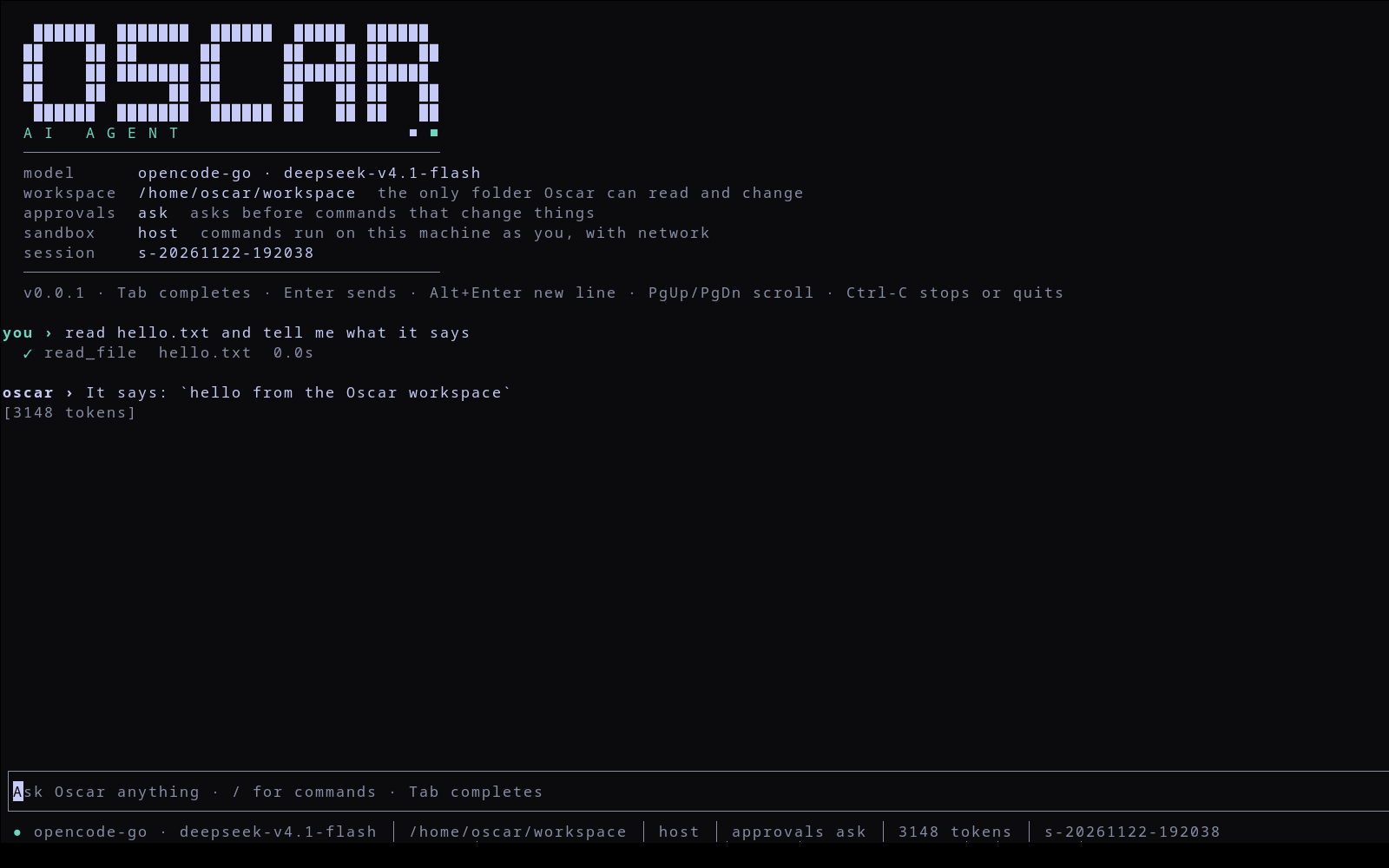
Example session: you ask Oscar to run the tests and check the README. Oscar reads README.md, asks for approval before running cargo test, you allow it once, and Oscar reports that the tests pass and the README matches the CLI flags.
The installer reads Oscar's signed release manifest, checks its minisign signature with
the key built into the installer, verifies the archive's size and SHA-256, and places oscar in ~/.local/bin. No account, no package manager.
curl -fsSL https://oscar-agent.com/install.sh | shStatic binaries for Linux x86_64 and aarch64. Add flags after sh -s --: --channel beta for pre-releases, --version v0.1.9 to pin one.
No release for your machine? It builds from a checkout, or says how.
Later, oscar update does the same checks with the key built into the binary,
keeps the previous one (oscar update --rollback), and never runs by itself.
oscar import reads your Hermes folder and brings over your memory and user
profile, your persona, your skills, your MCP servers and your model settings, the
side-task models included. It shows the whole plan first and writes nothing until you add --apply.
Memory is merged within Oscar's budgets, and what does not fit is saved, not dropped.
Every skill goes through Oscar's skill scan. MCP servers come in untrusted, so their
writes ask you first. API keys move only with --keys, after you confirm, and
sign-in tokens never do. The plan also names what still lives in Hermes' folders, such as a
server's program or a file a skill uses, so you can move it before you uninstall Hermes.
oscar import                 # what would change
oscar import --apply         # do it
oscar import --apply --keys # its API keys toooscar import claude-code, codex or cursor brings their instructions, MCP servers and
skills, and oscar sessions import brings over Claude Code's and Codex's
conversations. See coming from another agent in the manual.Serious workloads run on Linux, and so does Oscar's boundary. Workspace mode jails every
command with Linux namespaces (user, mount, pid, network): only the workspace exists,
every .git is read-only, and there is no network. Other systems don't offer
that in the same form, so Oscar ships one static binary for x86_64 and aarch64 Linux.
Good homes for it:
Calm and predictable. It is what Oscar's own server runs.
The gentlest way in, and the distribution WSL2 installs by default.
Fresh kernels and current tooling, for when you want the new things first.
Rolling releases, for tinkerers who like to know every package by name.
wsl --install -d Ubuntu,
then the install line above, inside Ubuntu. macOS is not in 0.1. Any modern distribution
with a 5.x or newer kernel runs the static binary; workspace mode also needs unprivileged
user namespaces, and oscar doctor tells you whether you have them.Not a chat tab. Not a hosted assistant. A runtime you install, inspect, configure, and, if you ever disagree with its direction, fork.
One static binary for Linux. Config and keys in ~/.oscar, sessions in
SQLite, skills and memory as plain files. Nothing depends on an Oscar account.
The loop, tools, approvals and chat gateways are Rust. Your tools are Lua 5.4 in a sandboxed VM, small enough to read before you run it.
no Python or Node at runtimeHost mode works on your machine like you would, behind an approval gate, an audit
log and a guarded Oscar home. Workspace mode puts every command in a user-namespace
jail with no network and a read-only .git. Docker and SSH are there too.
OpenCode Go, OpenRouter, OpenAI or your Codex sign-in, Anthropic, Gemini, xAI, Bedrock, Vertex and local servers: more than forty in all. Oscar has no default provider to silently bill.
bring your own key · no assumed vendorMatrix with end-to-end encryption, Telegram and Discord in one process. The terminal's commands in every chat, approvals by button or reaction, and a delivery ledger that survives restarts.
matrix e2ee · telegram · discordSkills, memory and the curator live in your home directory. After your turns a background review keeps memory current and proposes skills; you accept them, it never silently rewrites one. Memory providers add long-term recall.
SKILL.md · MEMORY.md · proposals · curatorScheduled jobs in your time zone, delivered to any chat, with ready-made blueprints. A kanban board you share with Oscar. Unattended runs never wait for a person and refuse what needs one.
oscar cron · blueprints · kanbanAn OpenAI-compatible API with runs and approvals, editors over ACP, MCP servers as a
client and oscar mcp serve as one, and a local web dashboard.
Push-to-talk or hands-free voice with a local whisper.cpp and a free default voice. A real Chromium browser, with logins filled from a vault the model never sees.
whisper.cpp · free voice · chromium · vaultOscar's full-screen TUI shows the model, the workspace, the approval mode and the boundary before you type. Tool calls become compact cards. Approvals get a modal, not a paragraph.
o s a d, and i to redirect insteadEsc Esc: back to any message, edit it, forkCtrl+P command palette; Tab completes/plan first, /rollback after, /btw and /bg aside$EDITOR, and plain --line modeThe provider is a choice, not a default. Oscar routes each model to the API surface it actually speaks, and refuses a model it cannot run instead of silently downgrading it.
https://opencode.ai/zen/go/v1 OpenCode Go subscription. Chat, Anthropic-messages and Responses models routed per family.
https://openrouter.ai/api/v1 A large catalogue and provider routing. Oscar reads the live model list and marks what it cannot use.
oscar auth login openai-codex The OpenAI API with OPENAI_API_KEY, or your ChatGPT/Codex subscription by sign-in.
https://api.anthropic.com Native Messages API with ANTHROPIC_API_KEY. No subscription sign-in, on purpose.
GEMINI_API_KEY · XAI_API_KEY DeepSeek, Qwen, MiniMax, Kimi, GLM and many more by key; Qwen and MiniMax also by sign-in.
AWS_PROFILE · gcloud auth AWS Bedrock (Converse), Google Vertex AI and Azure AI Foundry, with the cloud credentials you already have.
CUSTOM_BASE_URL Ollama, vLLM, llama.cpp, LM Studio or any OpenAI-compatible server; name your own with [providers.<name>].
fallback = "openrouter:…" Fallback chains, key pools, model aliases, and mixture of agents: several models on one turn.
Oscar joins Matrix, Telegram and Discord as its own bot, all in one process: oscar gateway serve runs every platform with a token, answers chats side by
side, and restarts a failing platform on its own while the others keep answering.
Approvals show the exact command and are bound to the message that asked; only an
approver's answer counts. A delivery ledger means a restart never answers the same
message twice. /handoff moves a terminal conversation into a chat, and !handoff cli brings it back.
oscar setup gateways           # → credentials.env
oscar gateway serve            # every platform
oscar gateway install --start # systemd serviceMATRIX_E2EE_TRUST=any relaxes both, and says so.MATRIX_E2EE=on; without it they are refused. Messages and files always go encrypted.!new, !model, !status, !stop, !queue, !steer, !btw, !undo, !retry, !usage, !proposals, !help; / on Telegram.The approval list is a convenience. The operating system is the enforcement. A clever prompt meets a gate, an audit log and a tier no mode can skip; in workspace mode it also meets a jail it cannot talk its way out of.
Every tool call passes one gate. allow, ask, confirm and deny are policy tiers, not a security boundary. confirm (recursive deletes, force pushes, git reset --hard)
always asks a human, even in auto or yolo mode. deny is final in every
mode.
In workspace mode, shell tools run in a user + mount + pid + network namespace with a
chroot, capability drop and no_new_privs. A real escape attempt is in the
test suite.
Every .git entry is bound read-only; newly created ones are quarantined.
The agent can read its own source but cannot rewrite the record of what happened.
Known secret shapes are redacted before model or tool text leaves the process, and in
logs. Keys are never logged. By default no tool writes SSH keys, cloud credentials or
sudoers, and the file tools never read them or a project's .env.
MCP servers that arrive through oscar import, plugins, shared profiles or
an editor are untrusted: their tools that don't declare themselves read-only always
ask a person. A hook runs only once you allow it.
install.sh and oscar update check the minisign signature of
the release manifest before reading it, then the archive's size and SHA-256. Nothing
updates by itself; the previous binary stays for --rollback.
The loop and tools are Rust. Providers are adapters. State is SQLite and plain files. Lua is an extension point, not a second runtime to install.
The full architecture and every invariant live in the repository's design notes.
            ┌──────────────────────────────┐
  terminal  │  TUI · line chat · run       │
  gateways  │  Matrix · Telegram · Discord │
  api       │  API · editors (ACP) · MCP   │
            └──────────────┬───────────────┘
                           │
                  ┌────────▼────────┐
                  │   agent loop    │  prompt tiers · compression
                  └────────┬────────┘
                           │
             ┌─────────────▼─────────────┐
             │  approval gate → sandbox  │  deny · ask · confirm
             └─────────────┬─────────────┘
                           │
        ┌──────────────────┼──────────────────┐
        │                  │                  │
   files / shell        Lua tools        MCP / sources
        │                  │                  │
        └──────────────────┴──────────────────┘
                           │
                  ┌────────▼────────┐
                  │  SQLite + files │  sessions · memory · skills · jobs
└─────────────────┘v0.1.9 is the latest release of the first line; expect breaking changes until 1.0. This table is deliberately conservative: if it is not tested, it is not called done. Every change is in the changelog.
| Capability | State |
|---|---|
| Rust agent loop, tools, approval gate, SQLite sessions that survive a crash | tested |
| Full-screen TUI and plain line chat, voice mode, handoff to a chat | tested |
| Providers by name, per-model routing, fallbacks, key pools, mixture of agents | tested |
| Host, workspace (jail), Docker and SSH modes; .git binds, redaction, credential guards | tested |
| Matrix (with E2EE), Telegram and Discord in one gateway, as a systemd service | tested |
| Skills, memory, background reviews, curator, memory providers | tested |
| Scheduled jobs, blueprints, kanban board, hooks, plugins | tested |
| Web search, browser with a vault, MCP client and server, Lua tools | tested |
| OpenAI-compatible API, editors over ACP, web dashboard | tested |
| Signed installs and updates (x86_64, aarch64), rollback, backups, profiles | tested |
| Windows and macOS builds, other chat platforms, managed local models, cloud sandboxes, multi-machine agents, language packs | not in 0.1 |
oscar --version v0.1.9 · linux · x86_64 + aarch64
Install it on a Linux box, point it at a model you trust, and read the code that runs between you and your machine.